For OpenVPN and FortiGate SSL VPN on macOS

Connect your VPN without ever typing a one-time code again.

PassTunnel keeps your TOTP secret in the macOS Keychain, computes the current code and sends it with your password when you click Connect.

Download for Mac
brew trust passtunnel/tap && brew install --cask passtunnel/tap/passtunnel
Install with Homebrew

macOS 13+ · Apple silicon · Free & open source (MIT)

Work

vpn.example.com · OpenVPN

Disconnected

Current one-time code

482913

Click Connect: your password and this code go out together.

Sent to the server nothing yet

Interactive demo. These codes are not real.
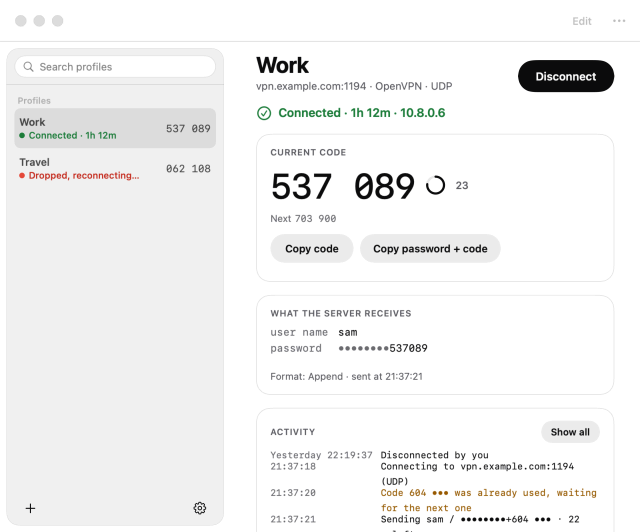
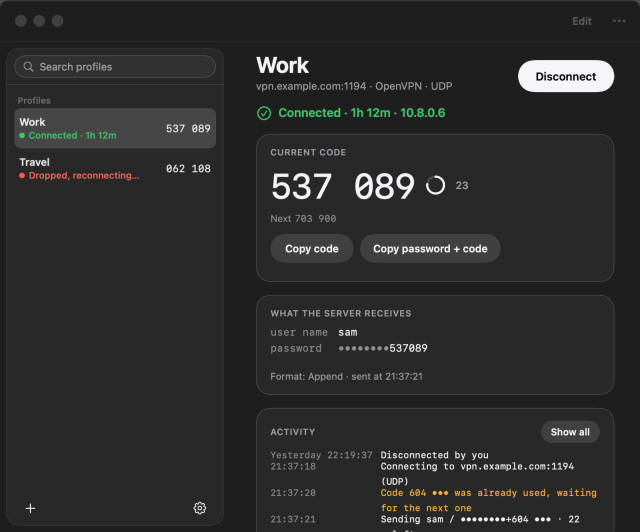
The PassTunnel main window: a sidebar with two VPN profiles, each with its state and live one-time code, and the selected profile, Work, connected, with its large current code, a countdown ring, Copy buttons, what the server receives and its activity log. The PassTunnel main window: a sidebar with two VPN profiles, each with its state and live one-time code, and the selected profile, Work, connected, with its large current code, a countdown ring, Copy buttons, what the server receives and its activity log.

One-time codes

One-time codes, handled.

PassTunnel generates the code and sends it with your password. If 5 seconds or less are left in the code window, it waits for a fresh one, and it never sends the same code twice.

Sent the way your server expects

Choose the format per profile. Pick one to see what your VPN server receives:

What your VPN server receives

The password followed by the code: 482913

The code goes right after your password.

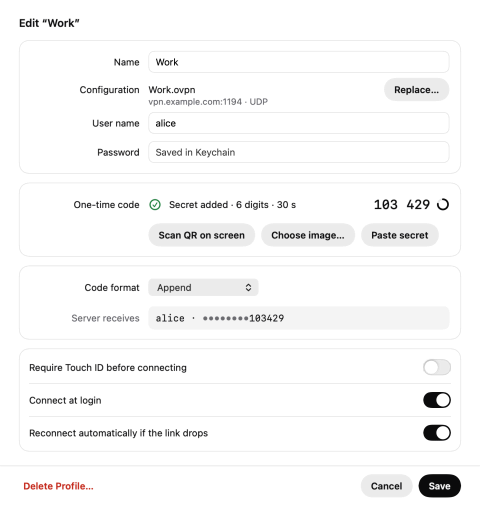
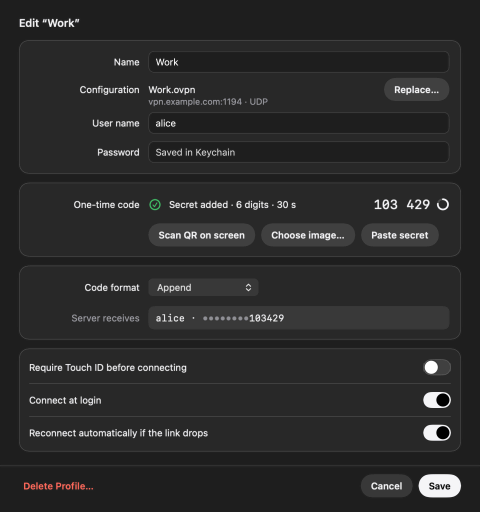
The profile editor: name, configuration, user name and password; the one-time code secret added, with its live code; the Append code format and what the server receives, the password masked; switches for Touch ID and reconnecting automatically. The profile editor: name, configuration, user name and password; the one-time code secret added, with its live code; the Append code format and what the server receives, the password masked; switches for Touch ID and reconnecting automatically.
The profile editor, with what the server receives.

An authenticator, built in

Live codes in large digits with a countdown ring. Click to copy; the clipboard is cleared after a minute, or the time you choose. Codes can be hidden.

QR import

Scan it on screen, drop a screenshot, choose an image or paste. No retyping a secret by hand.

Touch ID, per profile

Optionally require Touch ID for a profile. Its secrets are then encrypted with a Secure Enclave key.

Auto-type for web portals

An optional shortcut, ⌃⌥C, types the code into portals that still ask for it.

VPN client

A complete VPN client. Nothing else to install.

OpenVPN and FortiGate SSL VPN, with signed openvpn and openfortivpn bundled inside the app.

Your VPNs, one click away

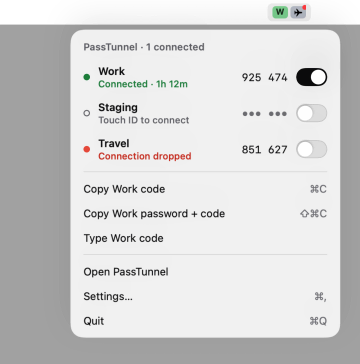
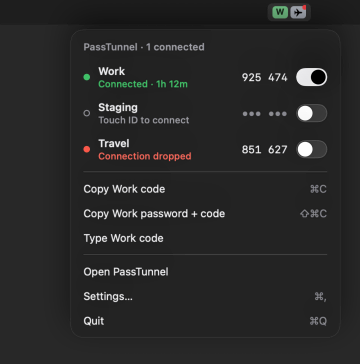
PassTunnel lives in the menu bar. Its panel shows every profile with its state and live code and a switch to connect or disconnect. Copy the current code, or type it when auto-type is on, without opening the window.

The PassTunnel menu bar panel, opened from the menu bar: Work connected with its live code and a switch, Staging asking for Touch ID, Travel with a dropped connection, then Copy Work code, Copy Work password + code, Type Work code, Open PassTunnel, Settings and Quit. The PassTunnel menu bar panel, opened from the menu bar: Work connected with its live code and a switch, Staging asking for Touch ID, Travel with a dropped connection, then Copy Work code, Copy Work password + code, Type Work code, Open PassTunnel, Settings and Quit.

Stays connected

Auto-reconnect with backoff, a health check, reconnect after wake and a session limit reminder.

Several VPNs at once

Keep Work and Lab connected side by side, each with its own status, log and settings.

Profiles your team can share

Hand out .passtunnel files. They never contain passwords, TOTP secrets or user names.

English and Turkish

The interface is available in both languages and follows your macOS language.

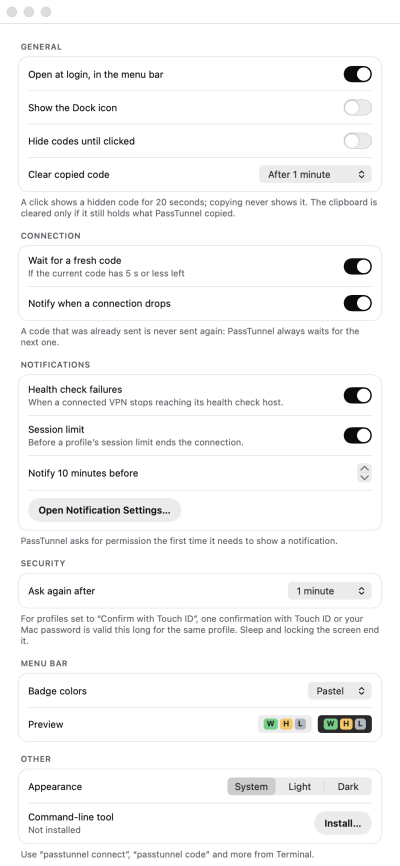
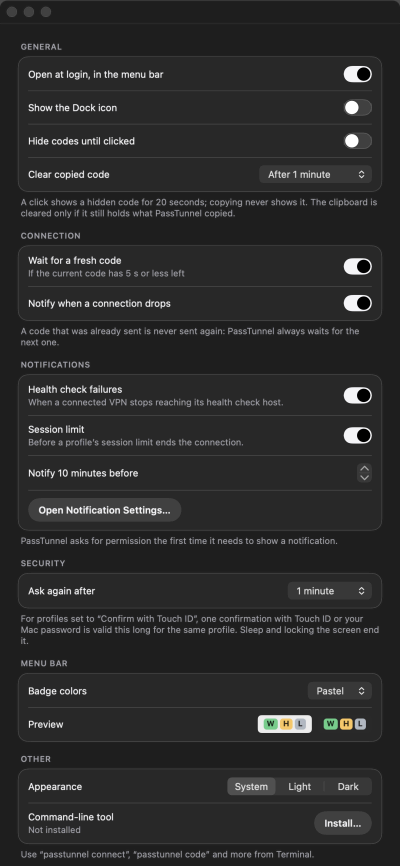
PassTunnel settings, General: open at login, show the Dock icon, hide codes until clicked, clear the copied code, wait for a fresh code, notifications, how long a Touch ID confirmation stays valid, appearance and the command-line tool. PassTunnel settings, General: open at login, show the Dock icon, hide codes until clicked, clear the copied code, wait for a fresh code, notifications, how long a Touch ID confirmation stays valid, appearance and the command-line tool.
General settings.

CLI & MCP

Script it. Or ask your assistant.

Everything the app does is available from the command line, and a built-in MCP server lets AI assistants see what your VPN is doing.

The passtunnel CLI

The same features as the app, with --json output and stable exit codes.

Terminal
passtunnel connect work
passtunnel code work -c
passtunnel status --json

Works with AI assistants (MCP)

passtunnel mcp is an MCP server, so Claude Code, Claude Desktop, Cursor, VS Code and other MCP clients can check VPN status, read logs and diagnose problems.

claude mcp add passtunnel -- passtunnel mcp
  • Read-only by default. Connecting needs --allow-connect.
  • Touch ID-protected profiles still ask on the Mac.
  • It never hands out passwords, secrets or codes.

Using Claude Desktop? Download the .mcpb bundle from the latest release and double-click it.

Security model

Your secrets stay on your Mac.

Creating a tunnel needs root. PassTunnel keeps that part small and signature-checked, and you approve it once.

What happens when you click Connect

PassTunnel.app, signed with Developer ID and notarized by Apple, talks over XPC to a small privileged helper that you approve once in System Settings and that accepts only the signed app. The helper runs only the signed openvpn or openfortivpn bundled inside the app, with sanitized OpenVPN configurations.

Login Keychain, no iCloud sync

Passwords and TOTP secrets stay in your login Keychain on this Mac. They do not sync to iCloud.

Only your VPN server

Nothing is sent anywhere except your VPN server. No sudoers rule and no admin password at every connect: you approve the helper once.

Read the full security model SECURITY.md, including what PassTunnel does not protect against.
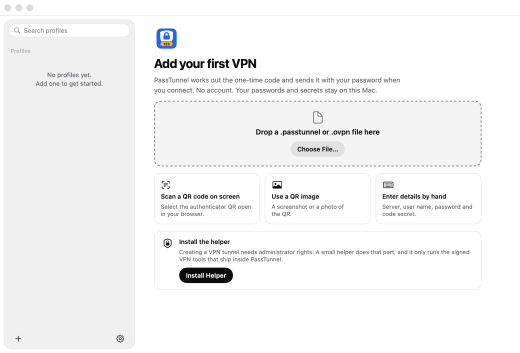
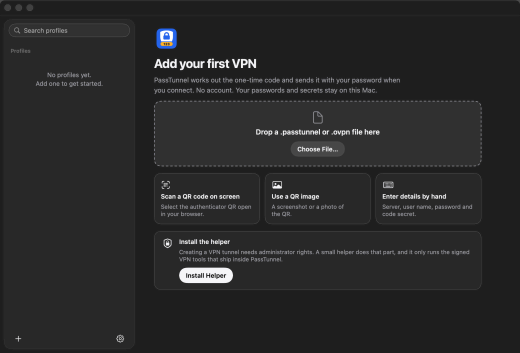
The first-run view: Add your first VPN, with a drop area for a .passtunnel or .ovpn file, three ways to add a profile (scan a QR code on screen, use a QR image, enter details by hand) and an Install the helper card: creating a VPN tunnel needs administrator rights; a small helper does that part and only runs the signed VPN tools that ship inside PassTunnel. The first-run view: Add your first VPN, with a drop area for a .passtunnel or .ovpn file, three ways to add a profile (scan a QR code on screen, use a QR image, enter details by hand) and an Install the helper card: creating a VPN tunnel needs administrator rights; a small helper does that part and only runs the signed VPN tools that ship inside PassTunnel.
The first run: add a VPN, then approve the helper once.

Install

Three ways in.

macOS 13 or later on Apple silicon. Free and open source under the MIT license.

Homebrew

Trust the tap, then install the cask.

Terminal
brew trust passtunnel/tap
brew install --cask passtunnel/tap/passtunnel

FAQ

Questions

Why does PassTunnel need a privileged helper?

Creating a tunnel interface and changing routes and DNS requires root. Instead of a sudoers rule or an admin password at every connect, PassTunnel uses a small helper that you approve once in System Settings. It only accepts the signed app and only runs the signed openvpn and openfortivpn bundled inside it, with sanitized OpenVPN configurations.

Where are my secrets stored?

In your login Keychain, with no iCloud sync. With Touch ID turned on for a profile, its secrets are encrypted with a Secure Enclave key.

Which VPN types does it support?

OpenVPN and FortiGate SSL VPN. Signed openvpn and openfortivpn are bundled, so there is nothing else to install, and you can connect several VPNs at once.

Does it work without TOTP?

Yes. Set the one-time code to “None” for a plain user name and password or a certificate-only VPN, or to “Ask each time” if you use a hardware token or SMS.

Click Connect. Keep your phone in your pocket.

Free and open source under the MIT license. macOS 13+ on Apple silicon.